
Home
Sensing Through Life
Overview
Projects from working in the Wearables and Nearables Technology Laboratory at the University of Illinois Chicago. I collaborated in an interdisciplinary group of biomedical engineering and computer science students, gaining hands-on experience assembling and designing various wearable devices and UIs. I acquisitioned, processed, and analyzed a diverse set of sensor data, created IoT systems, and worked with various Arduino sensors. Each project was developed in under two weeks and presented through a series of live demos and critques.
Context
IoT, Hardware Assembly, UI/UX Design
Role(s)
Lead Frontend Developer and UI/UX Designer, Fullstack Developer and Hardware Engineer alongside Kegan Jones, Rohan Kakarlapudi, and Sufyan Siddiqui
Skills
Tools
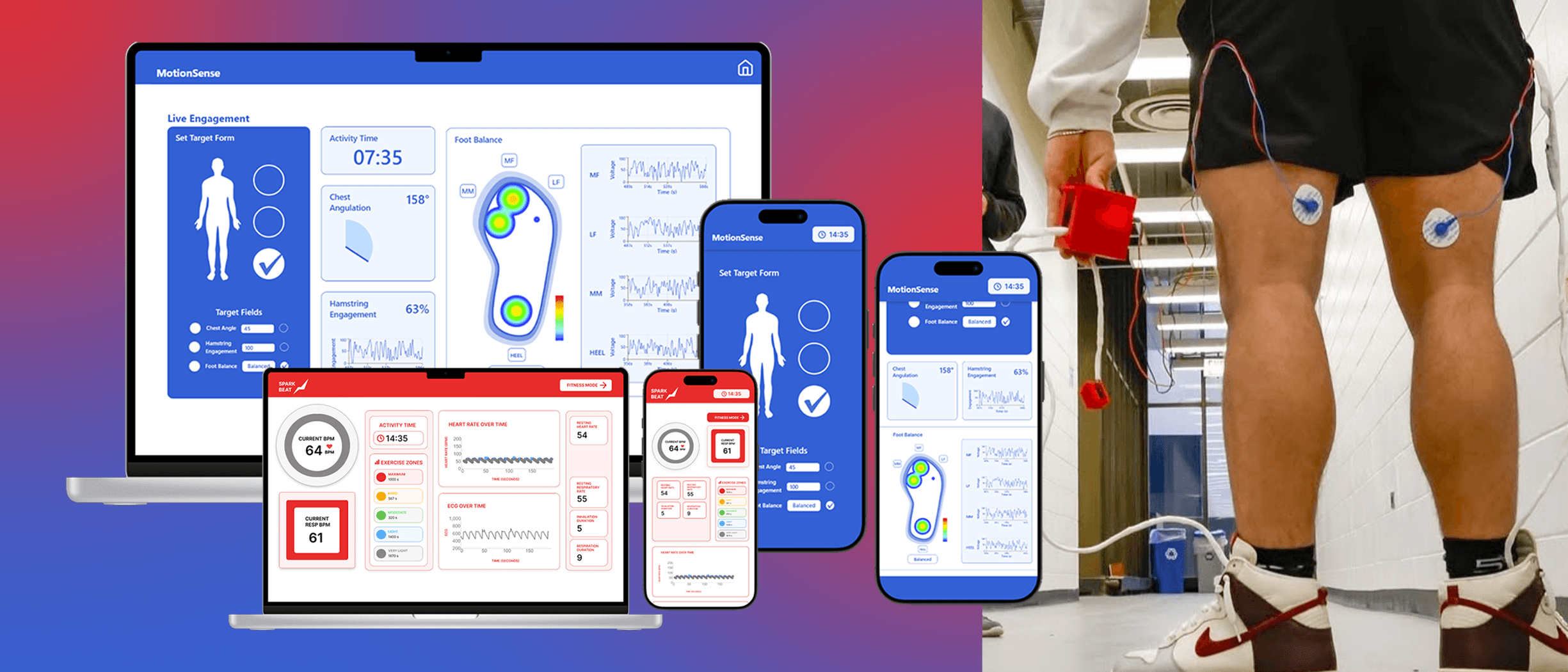
MotionSense
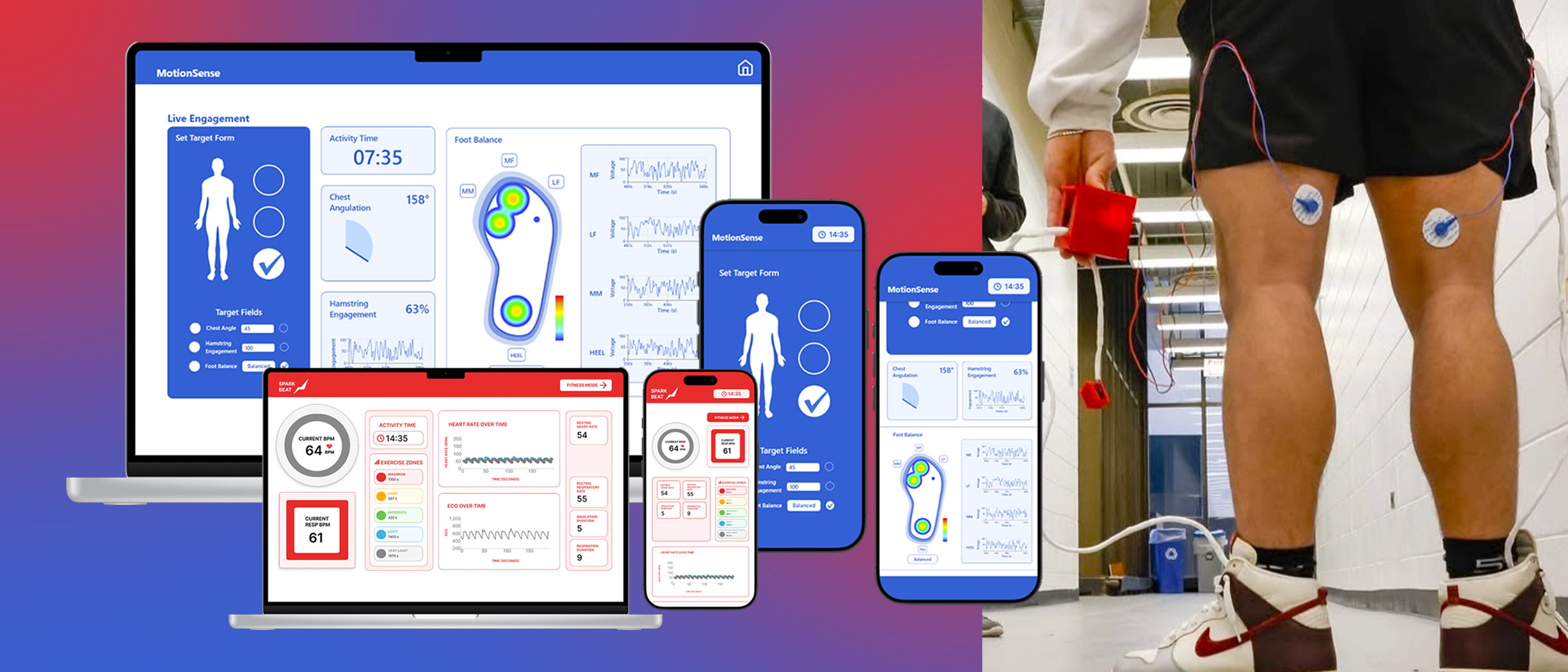
MotionSense — A Wearable System for Real-Time Assessment of Lower Body Form and Muscle Engagement During Exercise
Context
Poor exercise form, especially during lower body workouts like squats and deadlifts, can lead to long-term injuries and chronic back issues. Without real-time feedback, subtle mistakes often go unnoticed. MotionSense is a wearable multi-sensor system that monitors lower back posture, hamstring activation, and foot pressure, providing corrective insights that reduce injury and improve training effectiveness.
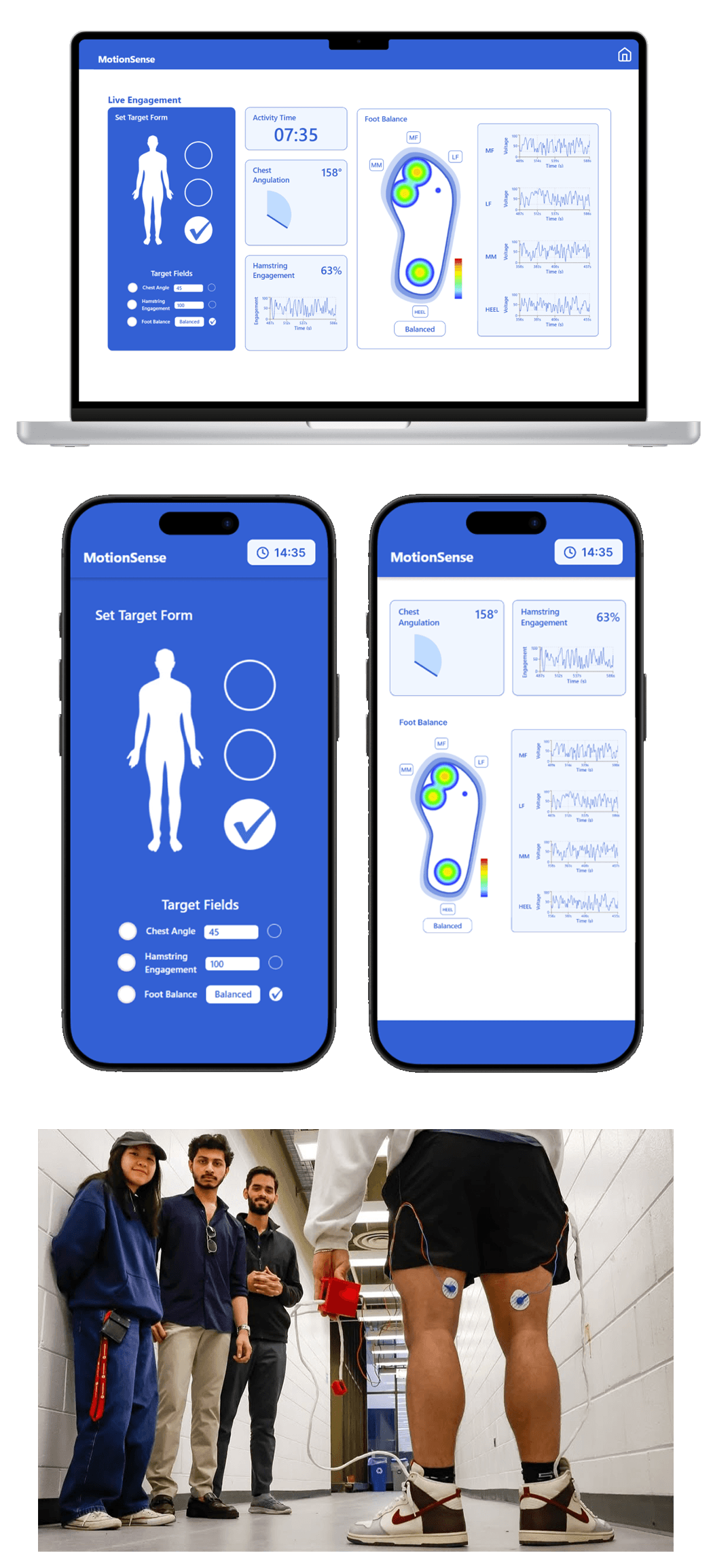
Tech Stack
React.js, Tailwind CSS, Node.js, Arduino C++
Hardware
- MIKROE EMG Click: Placed on the hamstrings to detect electrical activity during muscle engagement.
- FSR Sensors: Embedded into shoe insoles to measure foot pressure distribution.
- MPU6050 Accelerometer: Tracks lower back posture and chest angulation.
- FIREBEETLE BOARD-32P BLE 4.1: Provides Bluetooth device capabilities.
- 18650 Li-Ion Battery: Powers the device for up to 8 hours of use.
Design Criteria
- Shoe insole for FSR sensors.
- Thigh strap houses EMG sensors.
- Waistband clip contains the FireBeetle board, accelerometer, and battery.
- Display real-time angle of hip hinge.
- Show heat maps, balance feedback, and voltage over time graphs.
- Visualize hamstring engagement.
- Create an assistive target form interface.
Evaluation
Preliminary testing using squats and lunges across multiple users showed that EMG sensors detected hamstring activation within 50 milliseconds, FSR readings distinguished balanced vs. forward-leaning postures, and accelerometers consistently tracked trunk angle. The system accurately identified poor form in 84% of misaligned trials.
Project Breakdown
Problem
Wearable technology has the potential to revolutionize personal health tracking, yet many devices fail due to not meeting consumer needs.
After researching users and wearable assistive health tech, listed are key problems we identified in the wearable health tech space:
Lack of Accessible Health Monitoring
Many existing health monitoring devices are unaffordable or too complex for everyday users.
Poor Integration into Daily Life
There is a gap in designing devices that seamlessly blend into users' routines while maintaining comfort, aesthetics, and continuous operation without disruption.
Need for Real-Time, Continuous Monitoring
Current solutions don’t consistently offer real-time, continuous data streams that are accurate and intuitive enough to provide meaningful feedback or alerts.
Solution
My team developed five wearable bluetooth devices that monitor biometrics across heart rate, oxygen levels, stress, and activity patterns. The devices feature ergonomic designs, wireless communication, and intuitive accessibility focused UIs that provide real-time data visualization and alerts, helping users track their personal health and receive timely notifications on health anomalies.
Key Features
- Motion Tracking
- Real-time Data Visualization
- Time Tracking and Reporting
- Analytics Dashboards
- Custom Alerts and Notifications
- LED Indicators
- Bluetooth Connectivity
- Ergonomic Design
The Development Cycle
Each device followed a similar development cycle, beginning with research on existing adjacent solutions to gain insight on successful product and app design. Then followed conceptualizing, diagraming, low fidelity prototyping, formal UI designs, final construction, user testing, and final review.
Understanding Technologies
Before participating in this lab, I had limited experience with biomedical device design and engineering in general. Through these projects, I gained hands-on experience in hardware engineering, real-time data acquisition, UI/UX design, and frontend development. The following tools were instrumental in bringing the various biomedical devices to life:
Processing
Processing is a visual programming environment used for creative coding, interactive graphics, and generative art.
React + Node.js + TailwindCSS
A modern full-stack web development stack. React powers dynamic UIs, Node.js handles backend logic and APIs, and TailwindCSS enables rapid, responsive interface styling.
Figma
A collaborative design tool for creating user interfaces, prototypes, and design systems with real-time feedback.
Arduino
An open-source electronics platform based on easy-to-use hardware and software, ideal for building interactive projects and prototypes.
Python
A versatile programming language known for its simplicity and readability, widely used in data analysis, machine learning, web development, and automation.
3D Printing
A manufacturing process that creates three-dimensional objects by layering materials based on digital models, enabling rapid prototyping and custom designs.
Prototyping
Sketches of physical device designs and UI wire frames were made followed by circuit diagrams to plan hardware integration and creating low-fidelity prototypes. UI assets were initially designed in Figma then finalized in Illustrator and Photoshop.
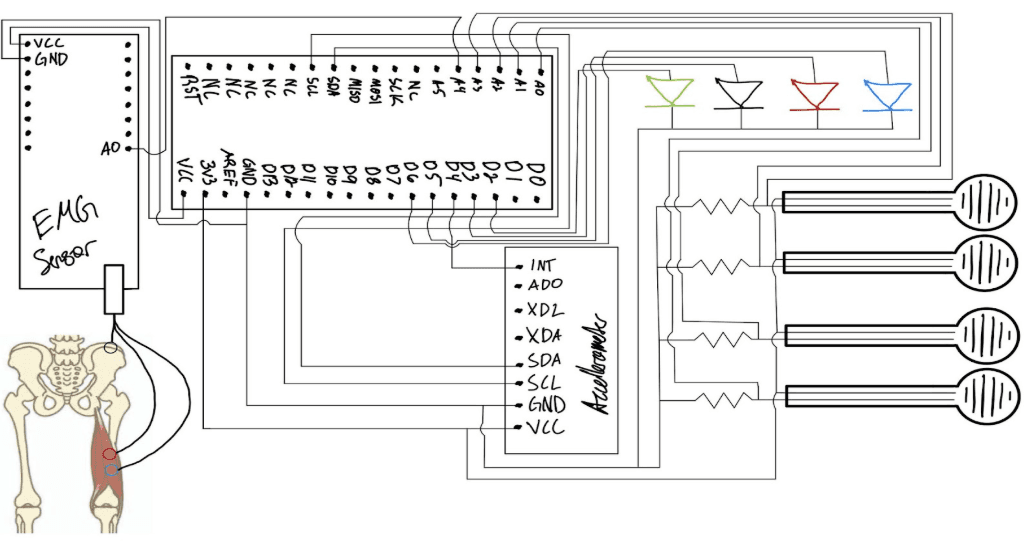

MotionSense Circuit Diagram
Designing for Health
I found that the most important step in designing the UI was grasping a strong understanding of the patients' specific needs and overall health goals. Learning about the nuances and difficulties patients face when managing personal health devices and apps were key in ensuring a compassionate design. It was very important to prioritized clarity, accessibility, and comfort as displaying biometric data can often be non-intuitive, confusing, and quickly overwhelming. Researching existing health monitoring UIs helped to identify effective hierarchy of information and the importance of clear labeling and soft visuals.
Go back to the top